
Facebook Conversion API vs Pixel: Which One Should You Use in 2025?
If you run Facebook or Instagram ads, you’ve probably heard about Facebook Pixel and Facebook Conversion API (CAPI).
Both tools help you track conversions, optimize campaigns, and measure ROI — but they work in different ways. With privacy updates like Apple’s iOS 14, choosing the right tracking method is more important than ever.
Here’s a clear, step-by-step breakdown of Pixel vs Conversion API, so you know which one is right for your business.
What Is Facebook Pixel?
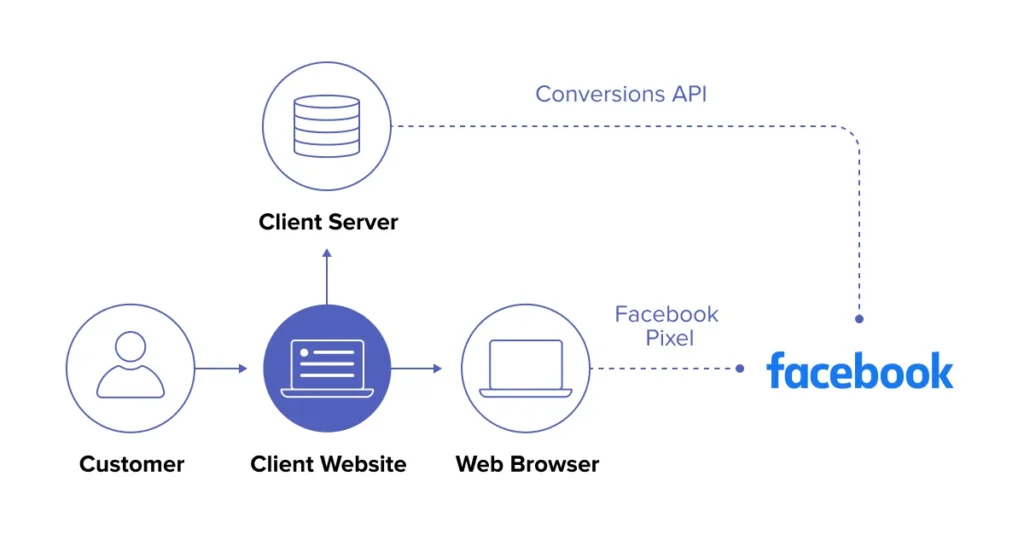
The Facebook Pixel is a piece of JavaScript code you place on your website.
It tracks actions like:
Page views
Add to cart
Purchases
Form submissions
This data goes back to Facebook so its algorithm can optimize your ads.
Problem: Pixel data can be blocked by:
iOS 14+ users opting out of tracking
Ad blockers
Browser restrictions
This means you may miss out on valuable data — making ads less effective.
What Is Facebook Conversion API (CAPI)?
The Facebook Conversion API (CAPI) sends data from your server directly to Facebook — bypassing the browser.
That means:
More accurate data
Better attribution
Improved optimization
It tracks the same events as Pixel (purchases, leads, etc.) but is much less affected by ad blockers or privacy settings.
Facebook Conversion API vs Pixel: Key Differences
Feature Facebook Pixel Facebook Conversion API
Where It Runs Browser (client-side) Server (server-side)
Data Loss Risk High (ad blockers, iOS14) Low
Setup Difficulty Easy (just paste code) Medium (server integration needed)
Data Accuracy Limited after iOS updates Very high
Best For Beginners or small campaigns Businesses running ads at scale
Should You Use Both?
Yes — the best approach is Pixel + CAPI together.
This is called “Facebook Conversions API Gateway” setup, and it:
Deduplicates events to avoid double-counting
Gives you the most complete tracking possible
Improves your ad performance by sending Facebook more reliable data
Many digital performance agencies and ppc management companies now recommend a dual setup as a best practice.
Step-by-Step: Setting Up Facebook Conversion API
Go to Events Manager in Facebook Business Manager
Select your Pixel
Click “Add Events” → “Using the Conversions API”
Choose a setup option:
Partner Integration (Shopify, WordPress, WooCommerce)
Manual setup (requires developer support)
Test events to make sure they fire correctly
If you’re unsure, work with a digital marketing strategy consulting agency or paid search advertising agency that offers PPC auditing services — they’ll ensure data accuracy.
Final Thoughts
The Facebook Pixel is still useful, but relying on it alone can hurt your ad performance due to data loss.
By combining Pixel + Conversion API, you send Facebook better data, get more accurate reports, and improve your campaign optimization.
If you’re serious about scaling ads, hire a digital growth agency or Google & Meta Ads company that understands advanced tracking — so you get every conversion counted.