
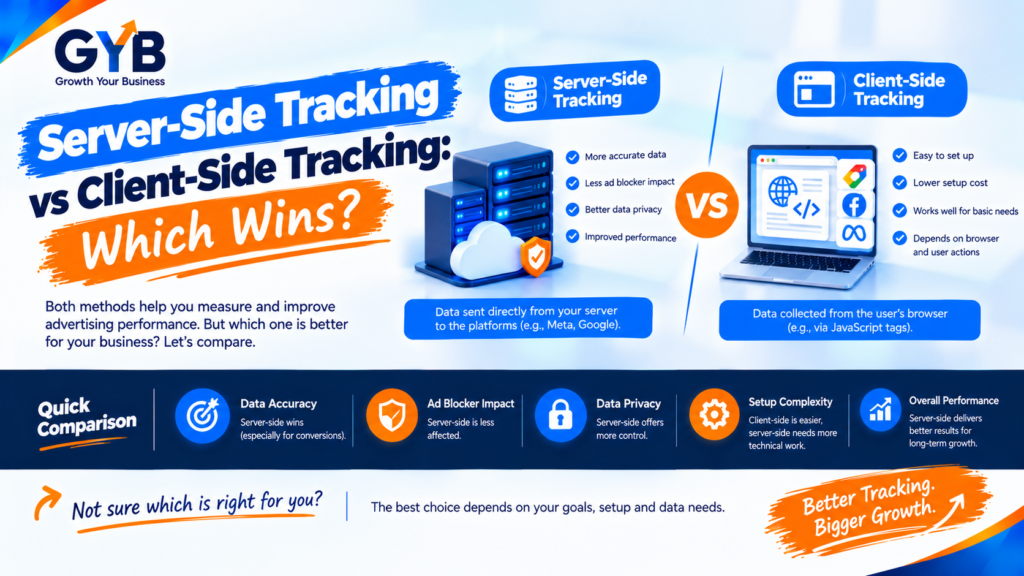
Server-Side Tracking vs Client-Side Tracking: Which Wins?
Server-side tracking vs client-side tracking comes down to where your tags run. Client-side tags run in the visitor’s browser, while server-side tags run on a server you control. Server-side can recover some lost data and gives you more control, but it costs more, needs expert setup and doesn’t replace consent. Most small businesses should fix client-side tracking first.
Updated October 2026 by the Growth Your Business team. Growth Your Business is a performance advertising agency for UK and US businesses offering Google Ads, Meta Ads, conversion tracking and CRM integration.
Key takeaways
- Client-side tracking runs tags in the visitor’s browser. Server-side tracking sends events to your own server first, which then forwards them to GA4, Google Ads, Meta and others.
- Server-side can reduce data loss from ad blockers and browser limits, but it is not a magic fix.
- It doesn’t remove the need for consent.
- Real cost is mostly setup and maintenance time, plus hosting.
- Server-side works alongside client-side tracking. It doesn’t replace your web container.
- If your basic tracking is broken, fix that first.
What is client-side tracking?
In a classic setup, a visitor loads your page and their browser runs a tag manager container. That container then loads a separate script for each platform: the GA4 tag, the Google Ads tag, the Meta Pixel and so on. Each script sends data straight from the browser to the platform.
This is how most WordPress sites work today, including setups built with Google Tag Manager and the Meta Pixel (link once published). It’s easy to set up and inexpensive, but everything depends on the visitor’s browser cooperating.
What is server-side tracking?
With server-side tracking, the browser sends events to one endpoint on your own domain (a tagging server you control). That server then forwards the data to GA4, Google Ads, Meta’s Conversions API and other destinations. The most common setup is a server-side Google Tag Manager container, hosted on Google Cloud Run or through a managed host.
Because the request goes to your own domain, some blockers and browser rules treat it differently from a request to a third-party tracker. You also gain more control over what each platform receives.
Server-side tracking vs client-side tracking: the comparison
| Client-side tracking | Server-side tracking | |
|---|---|---|
| Where tags run | Visitor’s browser | Your server (or managed host) |
| Who receives the data | Each platform directly | Your server first, then each platform |
| Ad blockers and privacy browsers | Often block or limit tags | Reduces some loss, but doesn’t eliminate it |
| Cookies | Mostly third-party scripts, shorter lifespan in some browsers | Can support longer-lived first-party cookies when set up correctly |
| Data control | Limited | You choose what is sent and to whom |
| Page speed | More scripts in the browser | Fewer scripts in the browser, though some web tags remain |
| Setup difficulty | Easy to moderate | Moderate to advanced |
| Cost | Free (Tag Manager) | Hosting plus setup and maintenance |
| Maintenance | Low | Ongoing (updates, monitoring, costs) |
| Consent | Required | Still required |
| Best for | Most small sites starting out | Businesses with meaningful ad spend and data-quality problems |
Why does client-side tracking lose data?
Several things can stop browser-based tags from reporting:
- Ad blockers and some privacy browsers block known tracking scripts.
- Safari and iOS limit how long some browser cookies last, which shortens attribution windows.
- Firefox and other browsers block cross-site tracking by default.
- Slow pages or script errors can stop a tag from firing before the visitor converts.
- Consent choices mean tags legitimately don’t fire when a visitor declines.
The loss is concentrated in Safari, iOS and browsers with blockers. For a business whose customers use these heavily, it can be a large share of the traffic that matters.
What does server-side tracking fix?
- More control over what data each platform receives (you can remove or hash fields before sending)
- Some recovered data from blocked or restricted browsers
- Longer-lived first-party cookies, when the server runs on a subdomain you control and is set up correctly
- A clean route for conversion APIs, such as the Meta Conversions API and Google Ads enhanced conversions
- Fewer third-party scripts loaded in the browser
What does server-side tracking not fix?
- Consent. If a visitor declines tracking, you still need to respect that. Server-side doesn’t give you permission to track them.
- Ad blockers completely. Some still block the first request, and vendor claims about “bypassing” blockers are only partly true.
- Bad tracking. If your events are wrong in the browser, they’ll be wrong on the server too.
- Low-quality data. Duplicate or missing events stay duplicate or missing.
- Skills and time. Someone has to build, monitor and maintain it.
How much does server-side tracking cost?
There are three cost buckets. Prices change, so treat the figures below as examples and check current pricing.
| Cost | What to expect |
|---|---|
| Hosting | A managed host can run from roughly $17 to $167 a month at September 2026 prices on one provider. Google’s own guide for Cloud Run recommends at least two instances in production, at roughly $45 each per month, and real cost varies with traffic and region |
| Setup | Often the biggest cost, in specialist time. Many projects take weeks |
| Maintenance | Monitoring, updates, debugging and a consent setup that keeps working |
A useful rule: the cost is mostly expertise and time, not hosting. If you can’t afford to maintain it, a broken server-side setup is worse than a well-run client-side one.
What server-side options are there?
| Option | What it is | Best for |
|---|---|---|
| Server-side GTM on Google Cloud Run | A Tag Manager server container you host yourself | Teams already on GTM who want full control |
| Managed server-side GTM host | A provider runs the server container for you | Small teams that want lower complexity |
| Meta Conversions API (CAPI) | Sends Meta events from a server or platform integration | Meta Ads advertisers |
| Google Ads enhanced conversions | Sends hashed first-party data to improve conversion measurement | Google Ads advertisers |
| Google tag gateway | A lighter way to serve Google tags through your own domain (check Google’s current documentation) | Sites wanting some first-party benefit without a full server |
| CRM-to-ad-platform feeds | Sends real lead and sale outcomes back to Google and Meta | Lead-gen businesses. See our CRM integration |
You can also read about the Meta Conversions API and about our server-side tracking service.
Do you need server-side tracking?
| Your situation | Suggested approach |
|---|---|
| Basic tracking is missing or broken | Fix client-side tracking first (GA4, Tag Manager, key events) |
| Small ad spend, simple site | Stay client-side, and add Meta CAPI or enhanced conversions if available |
| Meaningful ad spend, many iOS/Safari visitors, platforms disagree with your CRM | Strong candidate for server-side |
| You sell leads and want ad platforms to learn from real sales | Server-side plus CRM integration |
| Regulated sector (health, finance, legal) | Extra care. Review privacy and consent first |
If you aren’t sure, a short tracking audit will tell you whether your numbers are really being lost.
How do you move to server-side tracking safely?
- Audit your client-side tracking first. Confirm GA4, key events and your ad tags are accurate.
- Keep your web container. Server-side usually works alongside client-side, not instead of it.
- Create the server container and host it (Cloud Run or a managed host), ideally with at least two instances in production.
- Set up a first-party subdomain for your tagging server.
- Send GA4 first, then add Google Ads conversions and enhanced conversions.
- Add Meta CAPI with an event ID so Meta can deduplicate Pixel and server events.
- Test in Tag Manager’s preview mode for both the web and server containers.
- Compare numbers for a few weeks against your CRM and ad platforms before you remove any client-side tag.
- Check consent end to end, so declined visitors aren’t tracked.
How do you use AI to decide on server-side tracking, then verify by hand?
AI tools like ChatGPT or Gemini can help you think it through, but they can’t see your analytics or your hosting bills. Every step needs a human check.
| Step | What AI can do | What you must check manually |
|---|---|---|
| Decide if you need it | Turn your situation into a pros-and-cons table | Verify with your own data: browser mix, ad spend, platform vs CRM gaps |
| Estimate costs | Build a cost template (hosting, setup, maintenance) | Check current vendor pricing and get real quotes |
| Draft a migration checklist | List the steps and risks | Test every event in preview mode and on the live site |
| Explain errors | Interpret a preview log or error message | Reproduce the issue and fix the cause |
| Review results | Summarize an exported comparison of GA4, ads and CRM | Reconcile with real leads and sales |
Sample prompt:
I run a [type of business] in the [UK/US] with about [monthly ad spend range]. My tracking uses Google Tag Manager, GA4 and the Meta Pixel. Create a table of reasons to move to server-side tracking and reasons to wait, a cost template with blank cells for me to fill, and a migration checklist. Don’t invent prices or statistics.
Then fill in the real numbers yourself.
What about consent and privacy?
Server-side tracking doesn’t remove consent requirements. In the UK and EU, analytics and advertising tracking generally needs consent under UK GDPR, PECR and EU rules. In the US, state privacy laws vary. When the web tag sends events to a server container, the consent state should travel with them, and your setup must respect it. Don’t send personal data (emails, phone numbers) unhashed, and only send what you’re allowed to send. This is general information, not legal advice.
What are the common server-side tracking mistakes?
- Assuming it bypasses ad blockers completely
- Treating it as a way to skip consent
- Removing client-side tracking too early, before comparing numbers
- Not deduplicating Pixel and server events (so Meta counts twice)
- Running a single instance in production, then losing data when it fails
- Forgetting ongoing hosting and maintenance costs
- Not testing both containers
- Building it on top of broken tracking
Frequently asked questions
What is the difference between server-side tracking and client-side tracking?
Client-side tracking runs tags in the visitor’s browser, and each tag sends data straight to its platform. Server-side tracking sends events to your own server first, and that server forwards them to GA4, Google Ads, Meta and others. The difference is where the processing happens.
Is server-side tracking better than client-side tracking?
It can be more reliable and gives you more control, but it isn’t automatically better. It costs more, needs expert setup and doesn’t remove consent. For small sites with simple needs, a well-built client-side setup may be enough.
Does server-side tracking bypass ad blockers?
Partly. Some blockers and browser rules treat requests to your own domain differently, so you can recover some data. But some blockers still interfere, so it’s more accurate to say it reduces loss than to say it eliminates it.
Does server-side tracking replace Google Tag Manager?
No. A server-side setup normally keeps your web Tag Manager container too. The web container sends events to the server container, which then forwards them to your platforms.
How much does server-side tracking cost?
Hosting often runs from tens to a couple of hundred dollars a month, depending on traffic and provider, and Google recommends at least two instances in production. The bigger cost is usually setup and maintenance time. Check current pricing and get a written quote.
Do small businesses need server-side tracking?
Not always. If your tracking is accurate, your ad spend is modest and few visitors use blockers or Safari, client-side may do. If platform numbers disagree with your CRM or spend is significant, it may be worth it.
Does server-side tracking work with consent mode?
Yes, if it’s set up correctly. The consent state can travel with events to the server container, which should respect it. It doesn’t remove your obligation to get and honor consent.
Can I use server-side tracking for Meta and Google Ads?
Yes. You can send events to Meta through the Conversions API and to Google Ads through server-side tags and enhanced conversions. Use event IDs for deduplication with Meta, and test carefully.
Final thoughts
Server-side tracking vs client-side tracking isn’t a contest with one winner. Client-side is the right starting point for most businesses. Server-side is a powerful upgrade when you have real ad spend, real data gaps and the skills to maintain it. Fix your basics, measure the loss, then decide.
Sources
- Relevant Audience: Server Side Tracking: How It Works, What It Fixes and When You Need It
- Apexure: Server-side tracking: what it fixes, what it doesn’t, and what it costs
- Stackmatix: Server-Side Tracking: the 2026 explainer
- Cometly: Server Side Tracking Implementation Cost: What to Budget in 2026
- Add a link to Google’s official Tag Manager server-side documentation (search “server-side tagging” in Tag Manager Help and paste the URL)
Not Sure Whether You Need Server-Side Tracking?
Growth Your Business audits your GA4, Tag Manager, Meta and Google Ads tracking, and tells you honestly whether server-side tracking is worth it for your business. See our server-side tracking service, our Meta Conversions API service and our Google Tag Manager setup, or learn about us.
Prefer to talk first? Get a Free Consultation, or Book a Free 30-Minute Call, or Message us on WhatsApp or visit our Contact page.